Burning a CD/DVD image: Difference between revisions
>Samthecrazyman m Added a space that was missing |
Added headed and a bit more information. |
||
| Line 1: | Line 1: | ||
Burning a CD or DVD image is different from burning files themselves. Whereas usually you select the files you want to burn separately, an image contains all the files needed and can include advanced capabilities such as boot loaders and allows bit identical copying. Therefore you cannot just burn the file to a disc, the image has to be written with the 'Burn Image' command. | |||
= Burn an image with K3b on KDE 4 = | |||
This explains how to burn a CD on the '''KDE 4''' desktop using K3b. Please make sure K3b is installed (it's a separate package from the desktop packages but is usually installed by default). If you need more information on checking, please see [[Installing software packages|installing software packages]]. | |||
# Load a a blank CD/DVD into the drive. You'll know if you'll need either a CD or DVD by looking at the image's name. Also, check that your drive is capable of burning to the desired format. | # Load a a blank CD/DVD into the drive. You'll know if you'll need either a CD or DVD by looking at the image's name. Also, check that your drive is capable of burning to the desired format. | ||
Revision as of 02:34, 30 December 2015
Burning a CD or DVD image is different from burning files themselves. Whereas usually you select the files you want to burn separately, an image contains all the files needed and can include advanced capabilities such as boot loaders and allows bit identical copying. Therefore you cannot just burn the file to a disc, the image has to be written with the 'Burn Image' command.
Burn an image with K3b on KDE 4
This explains how to burn a CD on the KDE 4 desktop using K3b. Please make sure K3b is installed (it's a separate package from the desktop packages but is usually installed by default). If you need more information on checking, please see installing software packages.
- Load a a blank CD/DVD into the drive. You'll know if you'll need either a CD or DVD by looking at the image's name. Also, check that your drive is capable of burning to the desired format.
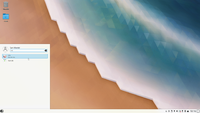
- Click on the Kickoff Application Loader (Bottom Left hand corner of the taskbar). Type in K3b and then press Enter.
- K3b should launch at this point. If this is the first time you've launched K3b, you can safely ignore the "System Configuration Problems" window that may appear for now.
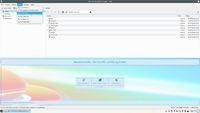
- Across the top menu, click "Tools" then click "Burn Image...". This should open the burn window.
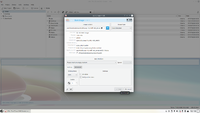
- In the top empty white box, type the path to the CD image. If you do not know the path, click the little folder icon next to it. Use your file manager to browse for the file. It is usually located in /home/Downloads if downloaded in a browser.
- It will then display an MD5 sum in the details dialogue after a short wait. Check this with the download page on here. If they match, you have a good copy! If not, you will have to try downloading it again.
- Leave all the settings in auto mode. These don't usually need changing unless you have specific requirements.
- Under "Burn Medium", check that it says "Empty (media type) medium". This means your blank disc has been detected and is empty.
- Once you are ready to go, click "Start" at the bottom of the dialogue. This will start the burning process.
- NEVER try removing the disc or power down the machine during burning. This will ruin the media you are writing to, rendering them unusable.
- If the burn process fails for one reason or another, you should try again with a fresh empty disc. The disc will be useless now unless it is re-writeable.
- If the burn process succeeds, your disc is now ready! You can check by reloading your disc in the drive and checking the contents with your file manager. You should see a bunch of files and folders on it.